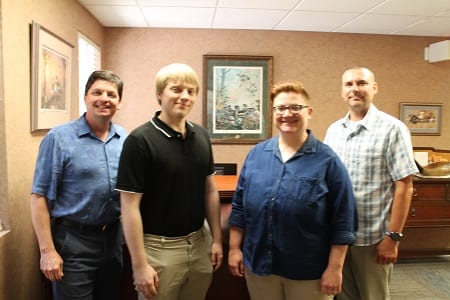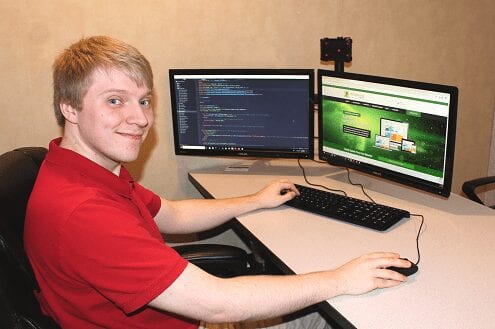
Mike McGraw joined the team of Packerland Websites, 2140 Velp Ave., as a WordPress web developer. McGraw, of Green Bay, earned an Associate degree in Web Design in 2016 at Northeast Wisconsin Technical College. After graduation, he designed websites as a freelancer before joining the Packerland Websites staff in late 2018.
Mike McGraw
“Mike is a great addition, helping us form a solid team of Web experts,” said Packerland Websites’ owner, Bill Koehne. “Our team now includes Mike, Alexa Vander Wyst, who has a degree in Graphic Communications, and myself, with a degree in Marketing. By combining these three areas of expertise, we can achieve the Internet goals our clients are looking for.” As a website developer, Mike excels at creating websites that load and function correctly.
“I take a look at functionality first, over aesthetics. Once I have that, I make sure the website looks professional and meets the customer’s goals,” he said.
Mike enjoys the critical thinking involved in coding and web developer projects. He also enjoys being a part of the broader tech community and staying up-to-date on the latest technology.
“It’s always changing. It’s never something you can get bored with,” he said. Mike developed an interest in websites while creating video games with friends at Two Rivers High School. “That’s were my whole web career started. I got into the coding and started creating videos games that I was proud of,” he said.
With the addition of Mike to the website developer staff, Packerland Websites is ready to serve more clients at its Green Bay and Abrams offices. Contact the website professionals at 920-826-5901.
When Will My Website Rank on Google?
So, you spent weeks finding a web builder, devising a sitemap and wireframes, writing content, and selecting photographs and graphics for your website. After spending the time and energy designing a brand new website, you ask yourself, “How long does it take for my website to rank?” The correct question is, “When do I begin seeing results?”
Unfortunately, the answer depends on a number of factors which determine your immediate placement on Google search. Ask yourself these questions: “How long has my website existed?” “Has a Search Engine Optimization (SEO) been done previously?”
SEO boils down to three factors:
How the website appears on-site
How the website appears off-site
The website’s relationship with Google.
On-page ranking factors
On-page factors refer to the unique content, headings, subheadings, titles, descriptions, and tags on a website. Review our blog and content page for ways to add depth to your website.
If you have a business page, consider specific keywords when registering it on search engines like Google, Bing, and Yahoo. For example, if you own a coffee house that also sells cookies, donuts and bakery, you want to rank for keywords such as coffee and bakery. You can write blogs that share coffee brewing techniques and recipes for baking.
When writing quality content, include keywords that reflect a solid conversational tone with no keyword stuffing. Keyword stuffing refers to a technique of cramming and overusing keywords throughout the text to influence the website’s ranking.
Off-site ranking factors
Off-page factors refer to backlinks that link to other social media sites. These backlinks offer an easy online path for visitors to find your business, but be cautious. Some backlinks connect visitors to disreputable sites containing annoying ads with spam and ransomware that harms the overall health of your webpage.
Make friends with Google
Results depend on your website’s reputation with Google, and reputation depends on how the website behaves and what attracts consumers and audiences. The use of Google’s maps, database, analytics, search console tools, and other products educates the search engine giant to identify your site, thereby possibly enhancing the overall promptness of your webpage’s placement.
How SEO Elves can help
With the use of our free scanner, SEO Elves will determine how your website stands on the internet in terms of business listings. Once you enter in your business name, address, and phone number, the elves will work their magic. Instantly, you will see whether or not your business information is listed on internet directories like Google, Yelp, Bing, and many more. This is a great way to evaluate your online presence.
SEO Elves also provides an internet health checkup, where our experts analyze seven detailed on-site SEO factors and five off-site SEO factors to improve areas that impact the ranking. View our product and service packages to determine what meets your business needs.
About Us: SEO Elves helps companies amplify their online presence by attracting visitors to their clients’ websites. Get found on the internet with the Elves’ Search Engine Optimization techniques. Based in Green Bay, Wisconsin, SEO Elves offers SEO packages, an Internet Health Check-Up, Social Media Marketing, and Blog/Content Writing. Call us at 920-639-5609.
WordPress 5.0 Update: What you need to know
On Dec. 6, WordPress released a major update to its website building platform. If you’re someone who regularly makes updates to the pages of your site or post regular blog posts, you’ll start to see some changes in the layout of your editing page. You can download the tutorial by clicking here or if you are still using the classic editor click the button below for that tutorial.
The release of WordPress 5.0 introduced a new page editor: Gutenberg. Gutenberg introduces “blocks” or dedicated content sections that you can easily add and arrange to your web page. If your site has already updated to 5.0, you’ll notice that the content on your existing pages has been organized into a Classic block. The Classic block has all the same features and capabilities that the previous page editor did, but now it is just a part of a bigger picture. To this bigger picture you can add Paragraph blocks, Picture and Gallery blocks, Text Heading blocks, and more! There are even Layout blocks that allow you to add buttons or arrange your content into columns with ease.
If your site is already updated to 5.0 and using Gutenberg, you can access these new block features on any Page Edit page by using the plus sign in the upper left corner:
If you click on a block to edit it, you will see more options appear just above the block. For even more settings, click the 3-dot icon at the end of the row of options:
Once a block has been added, you can move it to a new position on your page by hovering your cursor over the block and clicking and dragging the block by the grid icon:
WordPress 5.0 update Gutenberg
You’ll see that some of the familiar buttons on this page are not in their regular spots, but they haven’t left! The Preview and Publish/Update buttons are still in the upper right corner:
The Text/Visual options for viewing your content are now hidden in this 3-dot icon at the very top right of your screen:
Just click the 3-dot icon, then select either Visual Editor or Code Editor:
If you previously had content on your page, you’ll probably see that it’s been moved into a smaller editing area, which from now on will be known as the Classic Block. This has all the controls you’re familiar with, including the Add Link and Add Media buttons.
If you can’t see these options right away, make sure that you are in Visual Editor mode (see previous image) and click inside the text editing area to start editing the text.
Packerland Websites is working on a new tutorial booklet that will explain what each of these blocks do and how to use them. For those of you who have been using the WordPress page editor regularly, we hope this quick guide will get you comfortable with WordPress’ new look and help you maintain the current layout of your website. If you’re someone who doesn’t often look behind the scenes of your WordPress site, don’t worry! We’ll take care of the updates and inform you of any changes that will affect your site as soon as we are aware of them. If you have any questions, please don’t hesitate to Contact Us. Packerland Websites is here to help in the ever-changing world of web!
Earlier this month I received a call from a golf course getting ready to open for the season. The problem? The company’s free website displayed a message saying “No Tee Times Available.” Anyone who visited the website would be turned away, perhaps choosing to take their golf game elsewhere.
“How do we change the page?” the caller asked. I advised him to sign into his website to make the update. He didn’t know how to access the website or tweak the page.
“Can you help me?” he asked.
This was a tricky question.
A while back, someone at the golf course decided to go with a free website instead of the customized version we created. I helped him locate his sign-in page, told him how to sign in, and gave him some additional advice. I’m a nice guy, and I don’t want to see people suffer. I told him who to contact for further assistance, and the poor guy said, “They don’t return my calls!”
Like this client learned the hard way, there are pitfalls associated with a free website provider. These 10 benefits of hiring Packerland Websites should make you think twice.
Routine Maintenance. Our base price includes minor maintenance, including updates to software and plugins. We also provide daily back-ups and weekly monitoring for updates. This routine maintenance keeps websites functioning properly and offers protection against hackers.
Major Maintenance. Our base price includes 90 minutes of website “stuff,” like adding a slideshow, editing an existing page, or making other techie changes the client requests. We’re happy to partner with you to improve your online presence.
Customer service. We answer the phone and respond to emails. We can trouble-shoot, pinpoint your issue, offer advice, and fix the problem. Our reliable staff has the knowledge and availability you can count on when you need help.
Created with purpose. We ask about your business objectives and develop the website to address these goals. How concerned is a free website provider about your vision and mission?
Marketing professional. My college education and the experience I gained owning and running a business give me an insider’s perspective to online marketing and business management. I’m eager to share my ideas and take your business to the next level.
Customized URL. Companies can create WordPress websites easily enough for free, but URLs that end in WordPress.com or other telltale domains inform visitors you haven’t invested real time or money in your company’s website. Will that make them question your competence and long-term viability?
Professional Quality. A free website might look OK, but a professional-looking website shows you take pride in your product or service. You cared enough to invest in your online presence.
First Impression. In just fractions of a second, visitors will decide if they like your website and determine if they’ll stay or leave. A graphically appealing website will make a positive first impression. Packerland Websites’ graphic designers know how to incorporate the best design elements.
SEO Secrets. Packerland Websites enhances your ranking on search engines results pages with behind-the-scenes techie language, site maps, and other optimization techniques.
Local. We meet with clients in person at our Abrams and Green Bay offices. For clients outside Northeast Wisconsin, we can arrange a screen share and meet remotely.
Are you willing to settle for something just good enough? The old adage “Good enough is not good enough” rings true for websites. Don’t settle for a free website when Packerland Websites offers effective, custom-built websites at affordable prices. Contact us today to get started.
Designer joins Packerland Website team
Alexa Vander Wyst has joined the team of Packerland Websites in Green Bay as a WordPress web developer. A Little Chute native, Alexa earned a Bachelor of Fine Arts in Graphic Communications at Northern Michigan University in 2016. After graduation she landed a job designing websites in the U.P. More recently, she was employed as a graphic designer and website coordinator at a promotional products company in De Pere.
“With her background in graphic design and website development, Alexa brings a combination of talents to her new role at Packerland Websites,” said Bill Koehne, owner. “Aside from her technical skills, she has a knack for communicating with customers to help them create websites that meet their business goals.”
Alexa said she’s always had an interest in art, and the more she learned about graphic design the more she liked it.
“I like solving problems and I like organizing things, which are very good skills for a graphic designer,” she said. She’s looking forward to applying her visual design skills to create vibrant and user-friendly websites for clients of Packerland Websites.
In addition to her role as a full-time website developer, Alexa works part time behind the scenes at the Fox Cities Performing Arts Center. She enjoys listening to music and spending time outdoors, especially hiking and downhill skiing.
“With Alexa onboard, Packerland Websites is poised and ready to take on more clients,”Bill said. Contact us at 920-826-5901 or visit us at 2140 Velp Avenue in Howard to find out how we can help you.
Website banner photo: Professional tips
Here are six things to consider when snapping a website banner photo, because you want to greet visitors with a look that says, “Wow!” You have only one opportunity to make a good first impression, so your landing page needs to be attractive and memorable. That’s why an impressive website banner is so important. Visitors can quickly scan the banner image to learn about your website and your business. Colorful photos work great as website banners. They engage viewers and draw attention to your brand.
When posing a photo for a website banner, it’s best to position your subject to the right or left side to allow room for a Call to Action button. Take a high resolution, wide angle photo that you can crop to 437 pixels tall and 1,750 pixels wide.
So let’s take a look at what makes a good website banner photo, because snapping the right photo takes some planning.
1. Extra wide image
• Think of a website banner as a long sign stretched across a wide area.
• Most banners are three to four times longer than they are tall, 437 pixels tall and 1,750 pixels wide.
• Take a banner photo by holding your camera in the landscape position, not vertical.
2. Cropping a Banner Photo
The digital photos you snap will undoubtedly be square, not rectangular, which means you’ll need to crop the top and bottom of the photo so you’re left with a long, narrow rectangular image that serves as a website banner photo. To do this, begin with the end in mind. You know you’ll need a wide image, so when you pose the photo, think about how the image will look after it is cropped. Here are some tips:
• Remember that at least a third of the top and/or bottom of the photo will be cropped away, so place your subject appropriately.
• Position your subject to the right or left side, so that once the image is made into a banner, text can be overlaid on the banner without covering up the subject.
• Use a high resolution camera in order to maintain the clarity you need once you crop your photo.
3. Background
Put some thought into how the background looks when posing your subject.
• Avoid busy or distracting backgrounds that will take interest away from your main subject.
• Stand far from your subject (or stand closer but zoom out) so you have background on both the right and left sides of your subject.
4. Composition
• Rather than centering your main subject in the photo, offset the subject one-third of the way into the photo. This composition will increase interest and provide space to overlay a call to action box.
5. Go Panoramic
Consider using a panoramic setting on your camera or Smartphone to capture a wide screen image.
• Keep your camera as level as possible as you pan across your subject.
• Move the camera, not your body, when taking panoramic shots.
• Avoid panoramic photography of moving objects. The blurriness might ruin your photo.
6. Start experimenting
• To capture the best wide screen image for a website banner, take lots of images.
• Move around as you snap photos to experiment with different angles
• Move forward and backward to photograph subjects at varying distances from your subject
• Try different poses.
• Avoid harsh shadows.
Have fun creating the images that show off your brand, because website banners that “pop” will encourage visitors to more fully interact with your website.
SSL, HTTPS and Secure sites are the New Normal
At Packerland Websites we take privacy and security very seriously. We believe your website should be protected from hackers and eavesdroppers, and one way to ensure this is to transfer data along a secure connection. This secure connection is represented by the letters HTTPS in the URL of a website.
HTTP is short for Hypertext Transfer Protocol, which describes the way data is sent over the Internet. In comparison, HTTPS adds an S for Secure, which means the data is encrypted to protect it more fully. The final S shows that the data on a website is transferred over a Secure Socket Layer (SSL) connection. To get your website hosted on this secure connection, an SSL certificate is needed.
I know this is a bit technical, but there’s a really good reason to understand what HTTPS means, especially after Oct. 27 because Google Chrome updated to a new version and websites beginning with HTTP instead of HTTPS are now flagged as “unsecure.”
When someone visits an HTTPS website, a green lock icon will be displayed to indicate the website has an extra layer of protection. When someone visits an HTTP website, a warning message will say the website is not secure. Customers who see this message might be afraid to interact with the website, thinking that their data might be more accessible to hackers.
Here’s how one Google article explains the new policy: “Passwords and credit cards are not the only types of data that should be private. Any type of data that users type into websites should not be accessible to others on the network, so starting in version 62, Chrome will show the ‘Not secure’ warning when users type data into HTTP sites.”
If Packerland Websites installed an online store on your website — no worries. You already have the SSL certificate and HTTPS connection you need for privacy and protection. We made sure of that.
For the rest of our clients, we recommend you upgrade to HTTPS. The SSL certificate once was optional, but now is the norm. You want to make your website as safe as possible for yourself and your visitors.
As an added benefit, switching to an HTTPS website should improve your Google ranking because Google considers SSL as a ranking signal.
Packerland Websites is investing over $14,000 in its hosting system over the next 15 months in order to provide clients with the most superior and secure hosting system. We encourage you to transfer to our newest system.
Everyone knows you can save money by buying in bulk. Because of the number of websites Packerland Websites hosts, we have reached a volume which results in savings for our clients. You can upgrade your entire hosting system for less than the cost of what you’re likely to spend if you purchase an SSL independently. We take care of the entire process. If you are a new client of Packerland Websites, HTTPS is now standard practice for our hosting system, so no action is necessary.
How to Turn a Real Estate Website into a Sales Tool
Don’t you love it when things come together? We had the perfect melding of developer and client recently at Packerland Websites when our developer, Diane, was looking to buy property, and our client, Lisa Hanson, was looking to update the Hanson Realty website, Hanson-Realty.com.
Key features of
a real estate website
Right off the bat, Diane knew what she liked in a real estate website.
Immediate access to a search bar to look for properties.
A large number of listings on a search results page.
Freedom to search the website without being required to create an account.
Quickly visible stats for square footage, acreage, number of bedrooms, etc.
A simple way to save a property to look at later
An email notification for property updates, like price reductions
Easy-to-find phone numbers for real estate agents
“If a site isn’t easy to search and appealing to me, I don’t want to stay on that site,” Diane says.
Searching the real estate website is easy
With multiple MLS feeds linked directly to the website, home and property buyers can scan through the properties on the market or narrow their search in several different ways. Maps show the locations of the properties for sale, and clickable markers provide a nugget of information about each property. Buyers can schedule showings online and use the Mortgage Calculator to determine how much the property might cost over time.
For parents of school-aged children, the school pages list the schools in the district and their Great Schools rating, plus images from the community and descriptions of the area.All this, and mobile friendly to boot!
Benefits for the real estate agents
The real estate website becomes a sales tool for Realtors. Agents may have their own accounts and can track the clients they’re working with and manage their own leads. They can change their profiles or add new listings. They can see who viewed their listings or saved a search and know if this individual is an active client. Emails from their clients go directly to them, not to a general mailbox where a message might be forwarded to the wrong agent.
To evaluate how the real estate website is working, analytics are built into the dashboard to measure traffic, emails, and other types of engagement.
The power (and simplicity) of managing your own website
WordPress is the website creation tool used by Packerland Websites. A great thing about WordPress is that it’s a content management system that’s user friendly and allows room for creativity.
What does this mean for you? It means that you get a great-looking and highly functional website built by Packerland Websites to specifically meet your business objectives. It also means that you have the ability to manage the content on your website yourself to keep it up-to-date and fresh.
Basic functions come naturally. If you’re familiar with word processing software, then doing the basic functions in WordPress will come naturally. You don’t need a background in computer coding or technical knowledge to make adjustments.
Want to change your business hours or add a photo to your website? No need to call us! You’ve got the power at your fingertips to make the change. We’ll even teach you how to wield this new and amazing power through a one-on-one training session. Plus, we’ll provide ongoing support if you get stuck.
Updating your website shouldn’t take a lot of your time, leaving you more time to concentrate on your business. Plus, you can share the responsibility of updates among multiple users.
Here’s a cool tool! We’ve created an ingenious tool for you to use when you’re learning the ropes. We call it a Website Update Tutorial, or “WUT” for short, as in “WUT’s up?” “WUT’s happening?” and “WUT do think of me now?” But I digress…
The purpose of the WUT is to provide a starting point for routine changes. Under the “Our Services” tab of our website you’ll find the WUT, listing step-by-step instructions to make website updating easy. On our website you can watch a video or download a PDF of the WUT, or scroll through the instructions and visualize the process by looking at screen shots of the WUT.
Download the PDF of the WUT or visit https://packerlandwebsites.com/website-update-tutorial/ to see it online or watch the video tutorial.
You’re in the driver’s seat. We created different formats of the WUT, but each format contains the same easy-to-follow guide. Use whichever tutorial suits you best. The important thing is that you feel comfortable updating your website in order to keep your message accurate and fresh.
We like to make things easy for our clients, and this tutorial is a great example of that philosophy. When you partner with Packerland Websites for a website, you’re getting a website built by Packerland; managed by you.
Why trust WordPress as the platform of choice
At Packerland Websites, we think it makes a ton of sense to use WordPress as our platform for websites. And guess what, we’re not alone. WordPress makes up more than (20% of all websites) <– Wow, that was in 2017. It is now over 43%! on the Internet. There’s a good reason. The platform offers the flexibility we love, because no two websites are alike.
WordPress also encourages creativity because of its ability to be customized, mobile friendly, and owner managed to help you obtain your Internet goals. Plus, WordPress is easy to use, because we teach you how to use some WordPress basics. Check out our custom website update tutorial to see just how easy it is.
Previously WordPress was accused of having a bad rap from some developers who claim the content management system is too easy to hack, and nobody wants their website hacked. Believe me, nobody! Of course, those developers were promoting other platforms as well.
The No. 1 cause of website hacking is a lack of personal security regarding computer use and protective passwords. Other causes are phishing schemes, theft of your personal data, and third party access via outdated theme or plugins which can be vulnerable when a site is not maintained properly.
So how can you keep your WordPress website safe and secure? One of the best protections is to have secure access to your website. Don’t use “Admin” for a login name or “password” for your password. Be wary of suspicious looking emails. Before you click, look at who sent them, where any links may be taking you, and any suspicious downloads.
You also want to keep current with the updates to software and plug-ins. Performing regular checks and updates improves both the security and site functionality.
That’s where we come in. At Packerland Websites, we include basic maintenance updates for our clients as part of our hosting. While we cannot control your passwords and emails, Packerland Websites can take care of the regular maintenance updates that website require. We feel this is so important we automatically include this maintenance in our hosting package, for your security and ours.
There are additional levels of security that can be added to your website. To learn more, check out this article.