Green Bay: (920) 826-5901
Marinette: (920) 639-5609
Marquette: (920) 393-3156
Abrams: (920) 826-5901

The power (and simplicity) of managing your own website

WordPress is the website creation tool used by Packerland Websites. A great thing about WordPress is that it’s a content management system that’s user friendly and allows room for creativity.

What does this mean for you? It means that you get a great-looking and highly functional website built by Packerland Websites to specifically meet your business objectives. It also means that you have the ability to manage the content on your website yourself to keep it up-to-date and fresh.

Basic functions come naturally.
If you’re familiar with word processing software, then doing the basic functions in WordPress will come naturally. You don’t need a background in computer coding or technical knowledge to make adjustments.

Want to change your business hours or add a photo to your website? No need to call us! You’ve got the power at your fingertips to make the change.
We’ll even teach you how to wield this new and amazing power through a one-on-one training session. Plus, we’ll provide ongoing support if you get stuck.

Updating your website shouldn’t take a lot of your time, leaving you more time to concentrate on your business. Plus, you can share the responsibility of updates among multiple users.

website update tutorial on how to manage your own website

Here’s a cool tool!
We’ve created an ingenious tool for you to use when you’re learning the ropes. We call it a Website Update Tutorial, or “WUT” for short, as in “WUT’s up?” “WUT’s happening?” and “WUT do think of me now?” But I digress…

The purpose of the WUT is to provide a starting point for routine changes. Under the “Our Services” tab of our website you’ll find the WUT, listing step-by-step instructions to make website updating easy. On our website you can watch a video or download a PDF of the WUT, or scroll through the instructions and visualize the process by looking at screen shots of the WUT.

Download the PDF of the WUT or visit https://packerlandwebsites.com/website-update-tutorial/ to see it online or watch the video tutorial.

You’re in the driver’s seat.
We created different formats of the WUT, but each format contains the same easy-to-follow guide. Use whichever tutorial suits you best. The important thing is that you feel comfortable updating your website in order to keep your message accurate and fresh.

We like to make things easy for our clients, and this tutorial is a great example of that philosophy. When you partner with Packerland Websites for a website, you’re getting a website built by Packerland; managed by you.

Why trust WordPress as the platform of choice

Website building WordPress platform

At Packerland Websites, we think it makes a ton of sense to use WordPress as our platform for websites. And guess what, we’re not alone. WordPress makes up more than (20% of all websites) <– Wow, that was in 2017. It is now over 43%! on the Internet. There’s a good reason. The platform offers the flexibility we love, because no two websites are alike.

WordPress also encourages creativity because of its ability to be customized, mobile friendly, and owner managed to help you obtain your Internet goals. Plus, WordPress is easy to use, because we teach you how to use some WordPress basics. Check out our custom website update tutorial to see just how easy it is.

Previously WordPress was accused of having a bad rap from some developers who claim the content management system is too easy to hack, and nobody wants their website hacked. Believe me, nobody! Of course, those developers were promoting other platforms as well.

The No. 1 cause of website hacking is a lack of personal security regarding computer use and protective passwords. Other causes are phishing schemes, theft of your personal data, and third party access via outdated theme or plugins which can be vulnerable when a site is not maintained properly.

So how can you keep your WordPress website safe and secure? One of the best protections is to have secure access to your website. Don’t use “Admin” for a login name or “password” for your password. Be wary of suspicious looking emails. Before you click, look at who sent them, where any links may be taking you, and any suspicious downloads.

You also want to keep current with the updates to software and plug-ins. Performing regular checks and updates improves both the security and site functionality.

That’s where we come in. At Packerland Websites, we include basic maintenance updates for our clients as part of our hosting. While we cannot control your passwords and emails, Packerland Websites can take care of the regular maintenance updates that website require. We feel this is so important we automatically include this maintenance in our hosting package, for your security and ours.

There are additional levels of security that can be added to your website. To learn more, check out this article.

What Municipalities Need to Know About Upcoming ADA Compliance

ADA Compliance on Websites

Marketing scare tactics are often used to get people to buy something, and what makes them even more effective is when they have some truth woven into their message.

A current website sales tactic targets entities in the public sector, like school districts and municipalities, and promotes compliance with the Americans with Disabilities Act. Their sale pitch hinges on the premise that ADA compliance is inevitable and gives the impression you are already late.

The fear is that ADA compliance may become unreasonably expensive, technically difficult, and a real pain!

The scary truth is that accessibility to online content presented by public entities is in the process of being treated like accessibility to buildings. See https://www.ada.gov/websites2.htm

Here’s some background. ADA Title II requires that the programs, services and activities of public entities be accessible to people with disabilities. The U.S. Department of Justice is responsible for enforcing Title II and is also responsible for clarifying the rules surrounding accessible websites.

We believe that accessibility is important, and we predict that ADA compliance will become a mandate as time goes on. When this occurs, the requirements for handicapped accessible websites will be more strictly enforced.

The good news is this: An existing website, similar to an existing building, will be given more leeway in getting its accessibility up-to-date. One proposal granted municipalities two years in which to comply with the accessibility requirements.

More good news is that accessible design does not necessarily mean a lot of additional cost for the website owner. It’s possible that only small changes in color contrast or behind-the-scenes coding will be necessary to bring a website into compliance.

The third piece of good news is that the accessibility rules have not been formally adopted, so immediate compliance is unnecessary. Public entities have the opportunity to monitor the rule-making process of the USDOJ, watch for any new requirements and the exemptions that go with them, and note any deadlines set for ADA compliance.

A big challenge will be to find a website developer that you can get to know and trust. You will need someone to do the work with competence and timeliness, without a big price tag.

Packerland Websites is that developer. We have built websites for the local school district and for a number of municipalities. You can bet we’ll keep our eye on these compliance rulings and will be a trusted source for ADA compliance for your website, should the need arise.

In the meantime, don’t be swept away by the scare tactics of our competitors. It’s not worth it!

Converting your expertise into content

Struggling to find time to write content

 Business owners sometimes struggle to find the time to write content for their business website. Although they are experts in their field, they’re not necessarily experts at writing. And even if they are skillful writers and great storytellers, their time may be better spent on other facets of their business, including the tasks they alone can handle.

Writer to the Rescue, the content writing division of Packerland Websites, can help. By working with Joan Koehne, the Wonder Writer, businesses save time and energy and come away with effective content written specifically to meet their business objectives.

The process starts by having clients review a questionnaire, http://writertotherescue.com/website-content/questionnaire-for-website-content/, which is a good starting point for Joan to learn about their business and formulate website content that’s well-written and meaningful to the target audience.

Compelling content has many advantages:

• Reduces bounce rates

• Keeps visitors engaged longer

• Makes audience more likely to act in the way you envision to meet your business objectives

• Helps you build your authority in the field

• Grows your reputation as an industry leader

• Customizes your brand image

• Presents a tone and voice that reflect your vision and mission

• Helps your website rank higher on search engine result pages.

Whether you’re creating a new website or rebuilding a current one, Joan can work with you to create original content that accurately and professionally tells your story. Trust the Wonder Writer to convert your expertise into effective content. Contact her today at 920-639-1865 or Joan@WriterToTheRescue.com.

My Website Got Hacked! Who Is Responsible?

Hacked word image

The words “My website got hacked!” send shivers down people’s spines, even more so, web developers’. Why? Because the question often comes down to who is responsible. Simply put, the hacker is responsible. No one asked for this.

The real question is this: Who is responsible for cleaning things up? It is a good question. Much of the answer depends upon how your website is built. If it is an all HTML site, this is going to place a greater burden upon the developer. If this a CMS, content managed system site, such as WordPress, Drupal or Joomla, then the answer is: It depends.

WordPress is free, open source software, and its terms of service states that the software is licensed under the GNU General Public License. The GNU General Public License (GNU GPL or simply GPL) is a widely used, free software license which guarantees end users the freedom to run, study, share and modify the software. There is no guarantee for performance or anything else. Unfortunately, it is also the system hackers like to target because the software is free for them to view as well.

Over 74,000,000 or 25% of the web is powered by WordPress. This makes WordPress a popular target for hackers to look at as well, because a single virus has many places to check out. Good website developers do their best to have a website built properly to make it more difficult to have hackers break in.
However, that still does not answer the question of who’s responsible for fixing the website once it’s hacked.

Here are a few items to consider.

• Whose website is it?- Do you own your website?- Do you lease your website (essentially renting a website versus purchasing)?
• How did the hack occur?- Was it password compromised? If so, through whose password?- Was the virus or hack accidentally or uploaded and by whom?- Was it a vulnerability that snuck in between updates? (If you ever wonder why there are so many updates, it is usually because of added features or fixed bugs including those that hackers have exploited.)
• Is there a security agreement in place?- Security is different than hosting, different than maintenance and different than management- Are there disclaimers or limits within the security agreement?

Essentially, without some type of security agreement in place, the burden of fixing the website will land on the owner of the website, unless the owner can show negligence by the hosting service or developer.

A hacked website is similar to a flat tire on a car. Without some type of roadside warranty on your tire, you need to show negligence in order to prove someone else is at fault. Otherwise, the owner of the car is stuck taking care of a flat tire, even if it is a brand new set of tires.

We certainly would not want to leave this on such a dismal note, so here are some suggestions to consider.

• Have a regular maintenance schedule- Although this is no guarantee against hacking, it offers a huge layer of protection. Many updates are put in place AFTER hacks and vulnerabilities are discovered.- Auto updates are a tool to consider as well
• Secure passwords- This is one of your No. 1 defenses and helps to ensure your site is protected.
• Limited access to users- Editor hacks would be less severe than an admin hack
• Good hosting, which allows for regular backups- If the hack is discovered early enough, sometimes it can be fixed simply by rolling the site back to some point in the last thirty days. Note, a review of all systems, plugins, software and theme updates should be done as part of the rollback process.
• Monitor plugins
• Site-wide backup of source files
• SSL Certificate, which are files that allow secure connections between a web server and browser
• Consider third party solutions when collecting sensitive information like credit card data or personal information.
• Site Lock Plans- Daily malware scanning and removal (manual removal may cost extra)
• Have a security agreement in place- This does not guarantee your website won’t be hacked. It is more like insurance. If your site is hacked, you have insurance to help take care of the problem.

Even with all the above efforts, hackers are still trying to get in. If Target and Home Depot websites can get hacked with the security these corporations have in place, there is no 100% guarantee you can prevent it from happening to you. Unfortunately, there is not one perfect cure-all.

How does a security agreement work? Essentially, the people supplying the plan are most likely taking many, if not all, of the suggestions above and putting them into use. On top of that, they are factoring in time to take care of the hacks that still get through, because they know that a percentage of websites, even with protections, still have the possibility of issues.

Unless the hackers themselves are nabbed, the question is not so much who is responsible, but what allowed the hack to occur and how is it going to be fixed? Hopefully, if you do not have a security agreement, you were fortunate to choose a web developer willing to work with you to remedy the problem.

Website Colors

Color line


Choosing colors for web sites can sometimes be a daunting task. A web designer can spend hours in getting the right look to a banner and the basic colors.

Some helpful hints are to look at past advertisements that you may have run. Do you like the look and color layout? What are the colors in your logo?

Another great idea is to take a photograph or image that represents what you want. Individual colors can be drawn from that image. These can be used in background, text color and more.

When communicating with someone, especially a website designer about color choices, a challenge arises. There are so many variants of colors that green is not simply just green anymore. Having to adjust colors takes time and can be a drawn out process.

The three primary colors are red, blue and yellow. Secondary colors are purple, green and orange. From there it keeps breaking down into many more combinations.

Color choice can affect someone’s thoughts and moods. They may also be a determining factor on how longs someone remains on your site.

Men and women typically have a different color preference Men lean towards blue and orange to red and yellow, while women prefer red to blue and yellow to orange. Women can perceive considerably more colors than men can. In other words, while men may find peach, teal or peacock as mere notions, women associate these things with colors.

Culture can have an effect also. White represents a color of purity in western cultures but may be bad luck in eastern cultures.

Color choice may depend on if you want to be soothing, dramatic, exciting or informational. Red is dramatic and exciting, while blue may be soothing and relaxing. Red may be better for food and blue for business.

You want to avoid having too many colors. It will create eye fatigue and eventually make your website look jumbled and confusing. Typically, three colors are suggested. A couple more complimenting may not hurt, but it is a judgment call.


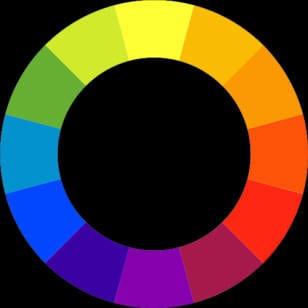
color wheel

Primary Colors are the root colors Red, Blue and Yellow. From the primary colors other colors can be developed.

Secondary Colors come from the midpoints of combining any two adjacent primary colors which are Violet, Green and Orange.

Tertiary Colors are a third generation color that come between the secondary colors: yellow-orange, red-orange, red-violet, blue-violet, blue-green, and yellow-green.

Complementary Colors are colors that are opposite of each other as shown on the wheel. Some complementing colors are red and green, blue and orange, yellow and purple.

Analogous Colors provides a harmony and blending of the colors. They would be three adjacent colors such as blue, green and yellow. They give a comfortable feeling as found in nature.


Color spectrum

The RGB color model shows colors in which red, green and blue light are added together in various ways to reproduce a broad array of color The name of the model comes from the initials of the three colors, red, green, and blue.

The values vary from 0 to 255.

(0, 0, 0) is Black
(255, 255, 255) is White
(255, 0, 0) is Red
(0, 255, 0) is Green
(0, 0, 255) is Blue
(255, 255, 0) is Yellow
(0, 255, 255) is Cyan
(255, 0, 255) is Magenta

color vendiagram


When selecting colors with your website designer, a great resource is Wikipedia, which gives many colors and their RGB color codes. Use the following links to make sure you and your designer are on the same page.

For more ideas on colors, you can also read about color strategies.

Wikipedia logo

Wikipedia gives a good review of web colors
http://en.wikipedia.org/wiki/Web_colors

Wikipedia gives a list of colors to choose from
http://en.wikipedia.org/wiki/List_of_colors

Color Strategies

color spectrum
Color Strategies

color vendiagram

When selecting colors with your website designer, a great resource is Wikipedia which gives many colors and their RGB color codes.

Colors affect our primary sense of vision and therefore can stir different feelings within a visitor. The culture in which someone lives in and their personal experiences will impact how they may mentally interpret a particular color.

An absolute statement on what impression a particular color makes is impossible. However, if understand some of the concepts of our western culture it will help us to see how varying a color and combining with others will create different moods and impacts.

Here is a chart that shows different connotations often associated with different colors.

[row]
[column lg=”4″ md=”4″ sm=”12″ xs=”12″ ]
Color
White
Red
Yellow
Brown
Green
Blue
[/column]
[column lg=”4″ md=”4″ sm=”12″ xs=”12″ ]
Positive
Clean, innocent, pure
Strong, brave, passionate
Happy, friendly, optimistic
Warm, earthy, mature
Natural, tranquil, relaxing
Strong, trustworthy
[/column]
[column lg=”4″ md=”4″ sm=”12″ xs=”12″ ]
Negative
Cold, empty, sterile
Dangerous, aggressive
Cowardly, annoying, brash
Dirty, sad, cheap
Jealous, inexperienced
Cold, depressing, gloomy
[/column]
[/row]

These are not absolutes. Check out sites similar to the one you want to have built and see which color gives you a feeling that you would like to instill in visitors to your site. Although your site will be unique in its own way, it will help to give you some ideas.


These are not absolutes. Check out sites similar to the one you want to have built and see which color gives you a feeling that you would like to instill in visitors to your site. Although your site will be unique in its own way, it will help to give you some ideas.

[row]
[column lg=”6″ md=”12″ sm=”12″ xs=”12″ ]
Color Example colors
[/column]
[column lg=”6″ md=”12″ sm=”12″ xs=”12″ ]
Color Example in homepage
[/column]
[/row]


When selecting colors with your website designer. A great resource is Wikipedia which gives many colors and their RGB color codes. Use the following links to make sure you and your designer are on the same page.

Wikipedia logo

Wikipedia gives a good review of web colors
http://en.wikipedia.org/wiki/Web_colors

Wikipedia gives a list of colors to choose from
http://en.wikipedia.org/wiki/List_of_colors

Website Information

Website Types
Paint Brush Stroke website design styles

There are as many website designs as you can imagine. Many contain similar elements.

When designing a site, a person must keep in mind, “What is the goal and what needs to be accomplished?”

Do you want a quick, easy and affordable page to ensure some type of web exposure? An info site normally made up of 1 or 2 pages acts as a colored flyer. It allows people to find you on the web. Even more important, it gives them a way to get in contact with you.

Do you have a product you want to sell like real estate or basic services? Then you may want a mini site, which is a little larger than, the info site but maybe has a page for photos and or maps.

Are you looking for a basic business site that is clean, professional and attracts customers to you without breaking the bank? We can design a website from nearly twenty web site templates that we have recently worked with and designed.

Are you looking for a custom site that matches your company colors and other marketing tools? For not much more cost, you can have a basic site that meets your need similar to the basic site, but one that is a custom design.

Finally, we can pretty much create whatever size and type of site you want. The sites listed are the most common sites that many small businesses are looking for while trying to stay within a tight budget. We would be happy to work directly with you in determining what would be the best solution for you

From here the possibilities go on. There is virtually no limit to the size of website that you can build.

To learn about the importance of the colors you choose for your website, click here.

Website Directions

corporate man confused

As I do more web and technology work, I sometimes see myself becoming the techno geek guy that takes things literally. It makes more sense now why. Sometimes a single missing semi colon can mess with an entire page. But, it is not just the technical stuff, but how we communicate.

A good reason to be specific with your website directions and requests can be seen in this short story.
The programmers wife tells him, “Run to the store and pick up a loaf of bread. If they have eggs, get a dozen.” The programmer returns later with 12 loaves of bread.

When I ask for a color preference, I sometimes get answers like; warm, rich, hot, high-end and attention getting. These are not colors. One could translate them as orange, gold, red, diamonds and flashing lights. I won’t even get started on the feelings being colors.

I was once asked to place a gold border around a web page. I did so and people thought it was to orange. Gold in a developers eye is and RGB or hexadecimal color as defined as what truly represents the color gold. Do you know how many greens there are? Many more then light, dark, forest and Kermit the frog. Oh, and technically, there is still a green.

Another area is editing text. When asking to have a word change, it would be courteious to reference the page and paragraph instead of saying there is a word that was spelled wrong (despite that it is generally copied and pasted from text supplied) to remove this reference from the website. It is what helps to keep minor maintenance minor.

When we ask for text we are asking for actual text. This is not photo copies, photos, pdfs, faxes or hand written notes. Text is something that can be copied and pasted into a word format. This is important as it helps to assure it is written and spell checked before receiving as well as timely for placing in the website.

Plus, Google reads text. Human beings can read letters printed on paper or shown on photos, but not Google. Search engines are our friends, so let’s keep them happy.

We really want to avoid the statement, “What I really meant…” Try and be concise and you will actually get a better product. Don’t be afraid to ask questions. And please, do not be offended if it sounds like you are being asked the same question twice because it probably means the first answer did not computer or register in a techno brained person’s mind.

Because, good enough is not good enough.

Mobile Design

woman holding a tablet and pressing submit button

NOTE: Wrote in November 2013 WOW, has so much changed. These were mobile.html built.


Mobile Design, often called responsive design is something new and so it does pull some hype. I think a lot of it is driven from people working with WordPress and since that is database, it is easy for a new person to work with it. However, it makes your creative design very limited. BUT, it does not mean that it is something new, cool and the direction future websites may go.

The question is if it is time to jump into one.

Every time I build a website, I try to create a vision statement and purpose the website is suppose to accomplish. Some websites like http://betsyshrift.com/ benefit with mobile response in the properties area because they can add QR codes to the for sale signs which are designed for mobile devices.

Other websites like a restaurant or storefront may benefit if people are looking for a number or address on their mobile device. Northwood Distillery puts a QR code on Heath Rum posters that take them to the mobile recipes page. But again these are QR driven and make more sense to have a website that is mobile friendly.

One solution is an automatic mobile redirect. It is more devices specific and still allows the user to go to the main site if they wish. Here is a couple that I did:
http://oldeworldpastriesplus.com/mobile.html
http://www.northwoodsdistillery.com/mobile.html
https://packerlandwebsites.com/mobile.html
http://www.abramsspotlightproductions.com/Mobile_Home.html (you can buy tickets via mobile also)

The bottom line comes down to, how many of your desired visitors are going to use a mobile device and why? I think I sell a lot of sites because I approach it as a marketing solution. I charge my client a one-time cost of $150 for this and since it is part of the main website, there is no additional hosting.

Responsive may be the best option for you and is something Packerland Websites offers. More importantly is determining what Internet marketing strategy will achieve the best return on investment and serve the purpose it is intended.

SNAPSHOT WILL SCORE YOUR WEBSITE ON