
Green Bay: (920) 826-5901
Marinette: (920) 639-5609
Marquette: (920) 393-3156
Abrams: (920) 826-5901

How To Add More Space Between Blocks


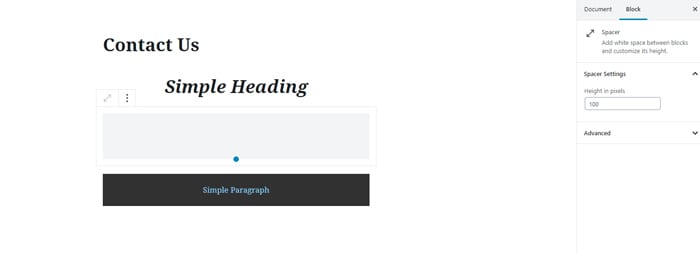
A Spacer Block will add space between blocks. The right sidebar has space to enter the height in pixels, or you can click the blue dot at the bottom edge of the space box and drag it to the desired size.
TO ADD SPACE BETWEEN SENTENCES

When you type text into the post or page and click Enter, a new paragraph block appears. To avoid creating a new paragraph while adding space between sentences, hold the Shift key down, and then press the Enter key.​

Green Bay

2325 Pamperin Road Suite 4
Green Bay, WI 54313

Phone: (920) 826-5901

Abrams

5406 Mary Ct
Abrams, WI 54101

Phone: (920) 826-5601

Marinette

844 Pierce Ave. Suite 101
Marinette, WI 54143

Phone: (920) 639-5609

Marquette

101 W Washington Ave. Suite 8
Marquette, MI 49855

Phone: (920) 393-3156

Conference Room 1 Conference Room 2 Conference Room 3
Conference Room 4 Conference Room 5 Conference Room 6

© 2024 Packerland Websites. (Privacy Policy | Terms of Site & Services Use | Non-Discrimination Policy | Accessibility Policies )