
Green Bay: (920) 826-5901
Marinette: (920) 639-5609
Marquette: (920) 393-3156
Abrams: (920) 826-5901

How to make a Facebook post shareable


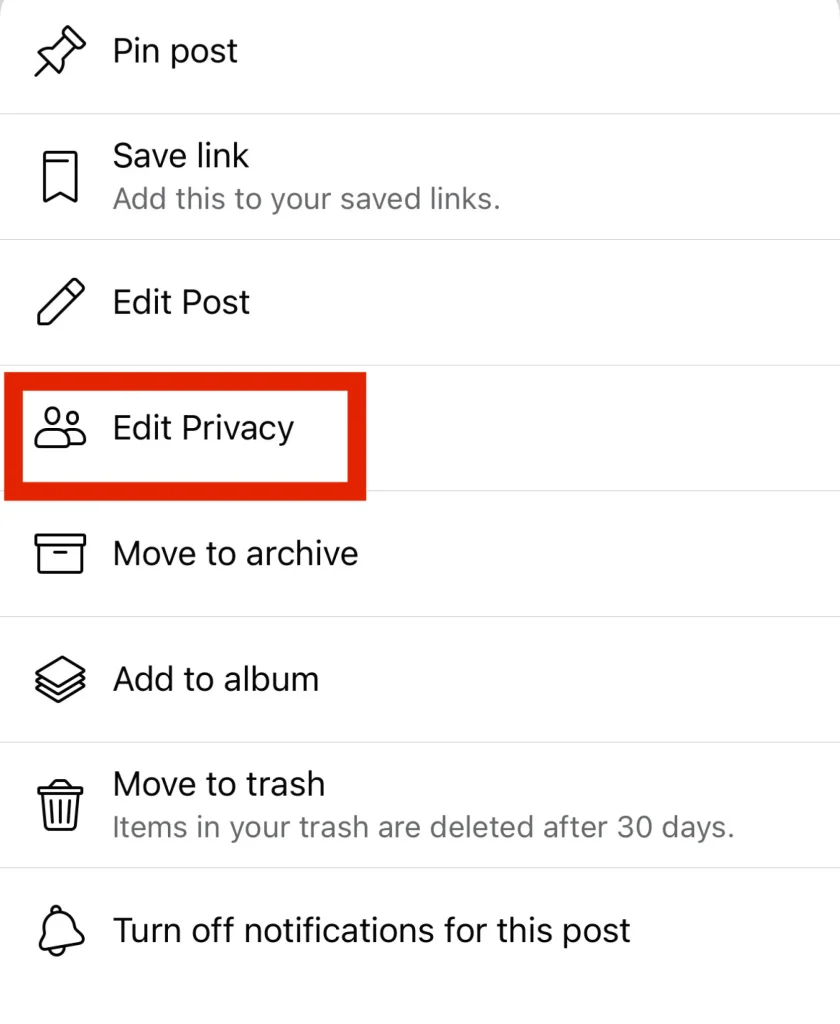
First, navigate to the post you want to make shareable. Click the three dots symbol in the upper right corner of that post. You’ll then see options to pin it, edit it, archive it, and so on. Select the option in the middle that says “Edit Privacy.”
The “Privacy” menu will show you who can see your post. You can control which specific friends can see it. You can control which friends can’t see it. You can even make the post completely private and only visible to you, if that’s what you want.

Once that is checked, you should be able to click “Done” and the post should be able to be embed/shared publicly.

Green Bay

2325 Pamperin Road Suite 4
Green Bay, WI 54313

Phone: (920) 826-5901

Abrams

5406 Mary Ct
Abrams, WI 54101

Phone: (920) 826-5601

Marinette

844 Pierce Ave. Suite 101
Marinette, WI 54143

Phone: (920) 639-5609

Marquette

101 W Washington Ave. Suite 8
Marquette, MI 49855

Phone: (920) 393-3156

Conference Room 1 Conference Room 2 Conference Room 3
Conference Room 4 Conference Room 5 Conference Room 6

© 2024 Packerland Websites. (Privacy Policy | Terms of Site & Services Use | Non-Discrimination Policy | Accessibility Policies )