Green Bay: (920) 826-5901
Marinette: (920) 639-5609
Marquette: (920) 393-3156
Abrams: (920) 826-5901

My Website Got Hacked! Who Is Responsible?

Hacked word image

The words “My website got hacked!” send shivers down people’s spines, even more so, web developers’. Why? Because the question often comes down to who is responsible. Simply put, the hacker is responsible. No one asked for this.

The real question is this: Who is responsible for cleaning things up? It is a good question. Much of the answer depends upon how your website is built. If it is an all HTML site, this is going to place a greater burden upon the developer. If this a CMS, content managed system site, such as WordPress, Drupal or Joomla, then the answer is: It depends.

WordPress is free, open source software, and its terms of service states that the software is licensed under the GNU General Public License. The GNU General Public License (GNU GPL or simply GPL) is a widely used, free software license which guarantees end users the freedom to run, study, share and modify the software. There is no guarantee for performance or anything else. Unfortunately, it is also the system hackers like to target because the software is free for them to view as well.

Over 74,000,000 or 25% of the web is powered by WordPress. This makes WordPress a popular target for hackers to look at as well, because a single virus has many places to check out. Good website developers do their best to have a website built properly to make it more difficult to have hackers break in.
However, that still does not answer the question of who’s responsible for fixing the website once it’s hacked.

Here are a few items to consider.

• Whose website is it?- Do you own your website?- Do you lease your website (essentially renting a website versus purchasing)?
• How did the hack occur?- Was it password compromised? If so, through whose password?- Was the virus or hack accidentally or uploaded and by whom?- Was it a vulnerability that snuck in between updates? (If you ever wonder why there are so many updates, it is usually because of added features or fixed bugs including those that hackers have exploited.)
• Is there a security agreement in place?- Security is different than hosting, different than maintenance and different than management- Are there disclaimers or limits within the security agreement?

Essentially, without some type of security agreement in place, the burden of fixing the website will land on the owner of the website, unless the owner can show negligence by the hosting service or developer.

A hacked website is similar to a flat tire on a car. Without some type of roadside warranty on your tire, you need to show negligence in order to prove someone else is at fault. Otherwise, the owner of the car is stuck taking care of a flat tire, even if it is a brand new set of tires.

We certainly would not want to leave this on such a dismal note, so here are some suggestions to consider.

• Have a regular maintenance schedule- Although this is no guarantee against hacking, it offers a huge layer of protection. Many updates are put in place AFTER hacks and vulnerabilities are discovered.- Auto updates are a tool to consider as well
• Secure passwords- This is one of your No. 1 defenses and helps to ensure your site is protected.
• Limited access to users- Editor hacks would be less severe than an admin hack
• Good hosting, which allows for regular backups- If the hack is discovered early enough, sometimes it can be fixed simply by rolling the site back to some point in the last thirty days. Note, a review of all systems, plugins, software and theme updates should be done as part of the rollback process.
• Monitor plugins
• Site-wide backup of source files
• SSL Certificate, which are files that allow secure connections between a web server and browser
• Consider third party solutions when collecting sensitive information like credit card data or personal information.
• Site Lock Plans- Daily malware scanning and removal (manual removal may cost extra)
• Have a security agreement in place- This does not guarantee your website won’t be hacked. It is more like insurance. If your site is hacked, you have insurance to help take care of the problem.

Even with all the above efforts, hackers are still trying to get in. If Target and Home Depot websites can get hacked with the security these corporations have in place, there is no 100% guarantee you can prevent it from happening to you. Unfortunately, there is not one perfect cure-all.

How does a security agreement work? Essentially, the people supplying the plan are most likely taking many, if not all, of the suggestions above and putting them into use. On top of that, they are factoring in time to take care of the hacks that still get through, because they know that a percentage of websites, even with protections, still have the possibility of issues.

Unless the hackers themselves are nabbed, the question is not so much who is responsible, but what allowed the hack to occur and how is it going to be fixed? Hopefully, if you do not have a security agreement, you were fortunate to choose a web developer willing to work with you to remedy the problem.

Website Colors

Color line


Choosing colors for web sites can sometimes be a daunting task. A web designer can spend hours in getting the right look to a banner and the basic colors.

Some helpful hints are to look at past advertisements that you may have run. Do you like the look and color layout? What are the colors in your logo?

Another great idea is to take a photograph or image that represents what you want. Individual colors can be drawn from that image. These can be used in background, text color and more.

When communicating with someone, especially a website designer about color choices, a challenge arises. There are so many variants of colors that green is not simply just green anymore. Having to adjust colors takes time and can be a drawn out process.

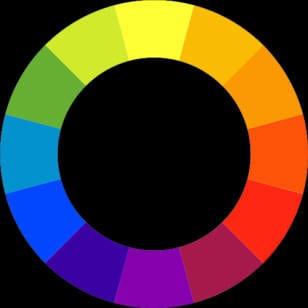
The three primary colors are red, blue and yellow. Secondary colors are purple, green and orange. From there it keeps breaking down into many more combinations.

Color choice can affect someone’s thoughts and moods. They may also be a determining factor on how longs someone remains on your site.

Men and women typically have a different color preference Men lean towards blue and orange to red and yellow, while women prefer red to blue and yellow to orange. Women can perceive considerably more colors than men can. In other words, while men may find peach, teal or peacock as mere notions, women associate these things with colors.

Culture can have an effect also. White represents a color of purity in western cultures but may be bad luck in eastern cultures.

Color choice may depend on if you want to be soothing, dramatic, exciting or informational. Red is dramatic and exciting, while blue may be soothing and relaxing. Red may be better for food and blue for business.

You want to avoid having too many colors. It will create eye fatigue and eventually make your website look jumbled and confusing. Typically, three colors are suggested. A couple more complimenting may not hurt, but it is a judgment call.


color wheel

Primary Colors are the root colors Red, Blue and Yellow. From the primary colors other colors can be developed.

Secondary Colors come from the midpoints of combining any two adjacent primary colors which are Violet, Green and Orange.

Tertiary Colors are a third generation color that come between the secondary colors: yellow-orange, red-orange, red-violet, blue-violet, blue-green, and yellow-green.

Complementary Colors are colors that are opposite of each other as shown on the wheel. Some complementing colors are red and green, blue and orange, yellow and purple.

Analogous Colors provides a harmony and blending of the colors. They would be three adjacent colors such as blue, green and yellow. They give a comfortable feeling as found in nature.


Color spectrum

The RGB color model shows colors in which red, green and blue light are added together in various ways to reproduce a broad array of color The name of the model comes from the initials of the three colors, red, green, and blue.

The values vary from 0 to 255.

(0, 0, 0) is Black
(255, 255, 255) is White
(255, 0, 0) is Red
(0, 255, 0) is Green
(0, 0, 255) is Blue
(255, 255, 0) is Yellow
(0, 255, 255) is Cyan
(255, 0, 255) is Magenta

color vendiagram


When selecting colors with your website designer, a great resource is Wikipedia, which gives many colors and their RGB color codes. Use the following links to make sure you and your designer are on the same page.

For more ideas on colors, you can also read about color strategies.

Wikipedia logo

Wikipedia gives a good review of web colors
http://en.wikipedia.org/wiki/Web_colors

Wikipedia gives a list of colors to choose from
http://en.wikipedia.org/wiki/List_of_colors

Color Strategies

color spectrum
Color Strategies

color vendiagram

When selecting colors with your website designer, a great resource is Wikipedia which gives many colors and their RGB color codes.

Colors affect our primary sense of vision and therefore can stir different feelings within a visitor. The culture in which someone lives in and their personal experiences will impact how they may mentally interpret a particular color.

An absolute statement on what impression a particular color makes is impossible. However, if understand some of the concepts of our western culture it will help us to see how varying a color and combining with others will create different moods and impacts.

Here is a chart that shows different connotations often associated with different colors.

[row]
[column lg=”4″ md=”4″ sm=”12″ xs=”12″ ]
Color
White
Red
Yellow
Brown
Green
Blue
[/column]
[column lg=”4″ md=”4″ sm=”12″ xs=”12″ ]
Positive
Clean, innocent, pure
Strong, brave, passionate
Happy, friendly, optimistic
Warm, earthy, mature
Natural, tranquil, relaxing
Strong, trustworthy
[/column]
[column lg=”4″ md=”4″ sm=”12″ xs=”12″ ]
Negative
Cold, empty, sterile
Dangerous, aggressive
Cowardly, annoying, brash
Dirty, sad, cheap
Jealous, inexperienced
Cold, depressing, gloomy
[/column]
[/row]

These are not absolutes. Check out sites similar to the one you want to have built and see which color gives you a feeling that you would like to instill in visitors to your site. Although your site will be unique in its own way, it will help to give you some ideas.


These are not absolutes. Check out sites similar to the one you want to have built and see which color gives you a feeling that you would like to instill in visitors to your site. Although your site will be unique in its own way, it will help to give you some ideas.

[row]
[column lg=”6″ md=”12″ sm=”12″ xs=”12″ ]
Color Example colors
[/column]
[column lg=”6″ md=”12″ sm=”12″ xs=”12″ ]
Color Example in homepage
[/column]
[/row]


When selecting colors with your website designer. A great resource is Wikipedia which gives many colors and their RGB color codes. Use the following links to make sure you and your designer are on the same page.

Wikipedia logo

Wikipedia gives a good review of web colors
http://en.wikipedia.org/wiki/Web_colors

Wikipedia gives a list of colors to choose from
http://en.wikipedia.org/wiki/List_of_colors

SEO Reality

SEO Reality

SEO reality sometimes gets lost when it is coming from telemarketers and fast talking salespeople. Add on top the lack of knowledge and confusion and finding a good SEO person feels like a gamble.

With people not really knowing what they are buying many people can set their own price. Some places charge up to $300 just to tell you what is broke. I like to use actions instead of words. I rather go into a meeting with a written analysis of on-site SEO as well as off-site SEO and why I believe the strategy will have an impact.

Real SEO efforts are like grains of sand on a scale adding weight. Because search engines guard exactly how they rank it can be difficult knowing exactly how much effort or time it will take. The moment someone guarantees page 1 rankings without paid advertising, a red flag should immediately jump out. Just ask Google.

Confusion is sometimes created with acronyms used by Internet techys, especially when terms are similar.  For example; SEO, search engine optimization means to rank organically (laymen’s terms for natural or unpaid ranking obtained through strategy). SEM, search engine marketing means buying adds to advertise on Internet pages.

Although I do both, the long term SEO strategy and goal is to make it easier for someone to find you versus you searching and paying for them (as in one click at a time).

Not everyone may find this stuff as super cool and interesting as maybe I do. It is like a gaming strategy creating the most opportune chance to be successful along with the reward of watching a site rise higher in standings which will result in greater success.

At the end of an SEO meeting, there are a number of options:

• Do nothing (yes deciding to do nothing is still a decision)
• Do it yourself
• Use someone else
• Hire me

It is really that simple. What does it cost you to look?

FAQ’s

Frequently Asked Questions in cube
FAQ’s Frequently Asked Questions

What do I need in order to set up a website?
The primary elements are a domain name (YourChosenName.com). Good content and a server where your site can be uploaded; and webhosting, which is basically a computer called a server that your html website sits on. Thus, when someone calls on your name, they will find the hosting computer which will send them your website information. (We help you get all of this.)

Do I need SEO, Search Engine Optimization?
Search Engine Optimization is not really an option to skip, unless you are purposely trying to keep your website hidden from public. There is both on and off page optimization that should be considered. This is necessary to help obtain organic (free) traffic and make it easier for your visitors to find you.

How long does it take to build a website?
The average amount of time is 3-6 weeks and depends upon the requirements of the site. Much depends upon how fast you get all your information to us. In extreme circumstances it can be done faster depending upon schedule.

How much does a domain name cost?
A domain name is your piece of Internet real estate. You will pay an annual fee of about $15-$20 per year. You can register for multiple years. Choosing a good name makes a big difference in how people will see you. We will be happy to assist you in making a good choice.

How much does hosting cost?
Hosting will vary depending upon the package you choose. It can range from $25 to $35 per month. Our most common package is $25.00 a month, which includes minor maintenance to your website.  Other items may include SSL certificates and ecommerce solutions. We will help choose the best package to meet your needs.

What if I already have my domain name and/or hosting?
We certainly can work with your domain name and hosting. We are more proficient at working with name and hosting which we provide, since that is a service we offer. We do not charge anything additional if you already have your domain name; however, you become more responsible for having the proper settings in place with your provider. For about $15 you can transfer your name to Packerland Websites and at the same time get an additional year added to your domain name for doing the transfer.

How much information do I need to supply?
It depends. You website project will be more affordable if you provide permission ready text and images that we can use to build your site. We do offer photography as well as writing and editing services for a fee. We can give you tips on the easiest way to submit your information for use on your website. Let us help create a road map for you to make the process more easy.

What is website maintenance?
Website Maintenance is taking vare of the servers where your site is hosted and software updates. We also offer some minor content management, but have systems that are free to use after your site is built.

What payment options are available?
Typically we require 25% down to get going. Most people prefer checks. We also can receive payments through most major credit cards through PayPal. Websites can be either a one time purchase or a monthly lease if it helps to fit your budget.

Spam Season is Here

spam and spammers signs

Summer is wrapping up and spammers are at it with messages like:

I am experiencing issues loading your site on my mobile device. This is a fairly common issue, especially since this April, when Google started heavily rewarding sites with a speedy mobile user experience, and punishing those with bulky, lagging designs that aren’t suited to small, vertical screens. With over 50 percent of people browsing the internet with their phones, that’s a fair share of the market to consider.

Here are some of the messages I’ve seen: My team has over ten years of experience developing elastic designs that can be viewed on any device. We’re also Google Partners and have received accolades from Inc. Magazine and the LA Business Journal. We would be happy to jump on a call with you to review these problems and more to help your brand get the best online visibility possible. What day this week works best for a call?
Your website is not being seen by major search engines like Google, Yahoo and Bing.

Your domain name expires now.

I am deaf and hearing impaired and……

Things to look for:
• Did they list a website of theirs?
•Did they give a phone number in which a real person answers (if you want to risk calling it?)
•Is the return email address Gmail or another generic mail service?
•Are there misspellings?
•Does it just smell wrong?

If in doubt, check with your web developer. There is a good chance they are starting to put together a form note since it is now happening so much. Some, like me, may be tired of it and actually make a blog post.

These are scammers and spammers, so be careful.

Multilingual WordPress Site

multilingual words in WordPress

Thinking of a multilingual blog or WordPress site? The good news is there is an easy, stable way to create one.

After researching a number of options (which will hopefully save you some time now), I found one that was the best solution. I have worked with Google translator and a couple other options, but found this to be the best solution when working with a WordPress website. The price is reasonable, and the control is wonderful.

My initial purchase, installation and setup were all relatively smooth on the first website I tested it on. With a bit of patience, things were set up quite nicely. As always, you should be updated to the most current version of WordPress.

If you are looking for a plug-in that converts the language for you, this is not it. What this plug-in does is virtually creates complimentary pages for your pages and posts which you can then switch between. In other words, it makes the user responsible for providing an accurate translation for the visitors.

You can do SEO, Search Engine Optimization for each language separately. You can set SEO attributes for the homepage, internal pages and categories for each language. Translations appear in their unique URL and you can even put different languages in completely different domains. The plugin follows Google Webmaster’s specifications for multilingual sites to the letter, letting your sites rank high on local search results.

You can also edit your URL string, categories and menu items. I did not because my complete blog is not multilingual, just a few posts to test it out. For those clients looking for a bilingual or multilingual website, we are ready to go and happy to provide one for you.

Fun and making a living

Now that I have a blog up and running, the question of what kind articles, comments, news, developments and personal things should be written about. The fun thing is it is my blog and so I can do what I want with it. So, there will be a little about each.

One exciting thing about building websites is that I really do enjoy it. At night, given the choice between a video game or messing around figuring out the right coding for new tools is entertaining, I usually find myself chasing down the code.

An example is having a website automatically directs the visitor to a mobile compliant site that gives a more friendly user experience. This then adds the challenge of, what if they want to go to the main site? There are different strategies, but usually one ideal solution. This solution was to add a cookie that expires in a one or two hour time frame which lets the user go the main site, but if later comes back, the mobile option is available.

Thus, not only is it entertaining, but I have a new super cool product to offer at a great price. Once it is installed, it costs nothing additional per month and you increase your visits and users experience. Life is a bit better when you can have some fun while working at the same time!

SNAPSHOT WILL SCORE YOUR WEBSITE ON